
Websites
Restaurant websites
Websites connecting the restaurant’s presentation with the booking journey. Compare a link to an existing booking engine, an integrated experience and a custom solution, taking tables, sittings, capacity and operating rules into account.
Overview and preparation
Who it is for
For restaurants presenting their offer and organising the route to a booking.
What you will find in this presentation
- Restaurant presentation and useful visitor information.
- A journey covering date, time, party size and availability.
- Three levels of connection to the booking system.
Before we begin
- Identify the existing engine, sittings, capacity and booking rules.
- Gather menus, images, contact details and venue information.
Prices and terms are provided in this presentation and the PDF. The final scope is confirmed in the proposal for each project.
READ ON THE WEBSITE
Presentation content
Choose a section in the contents or keep reading. The PDF remains available as an alternative.
WEBSITES · RESTAURANTS

RESTAURANT WEBSITES
More bookings. Smoother service.
Restaurant websites and bookings
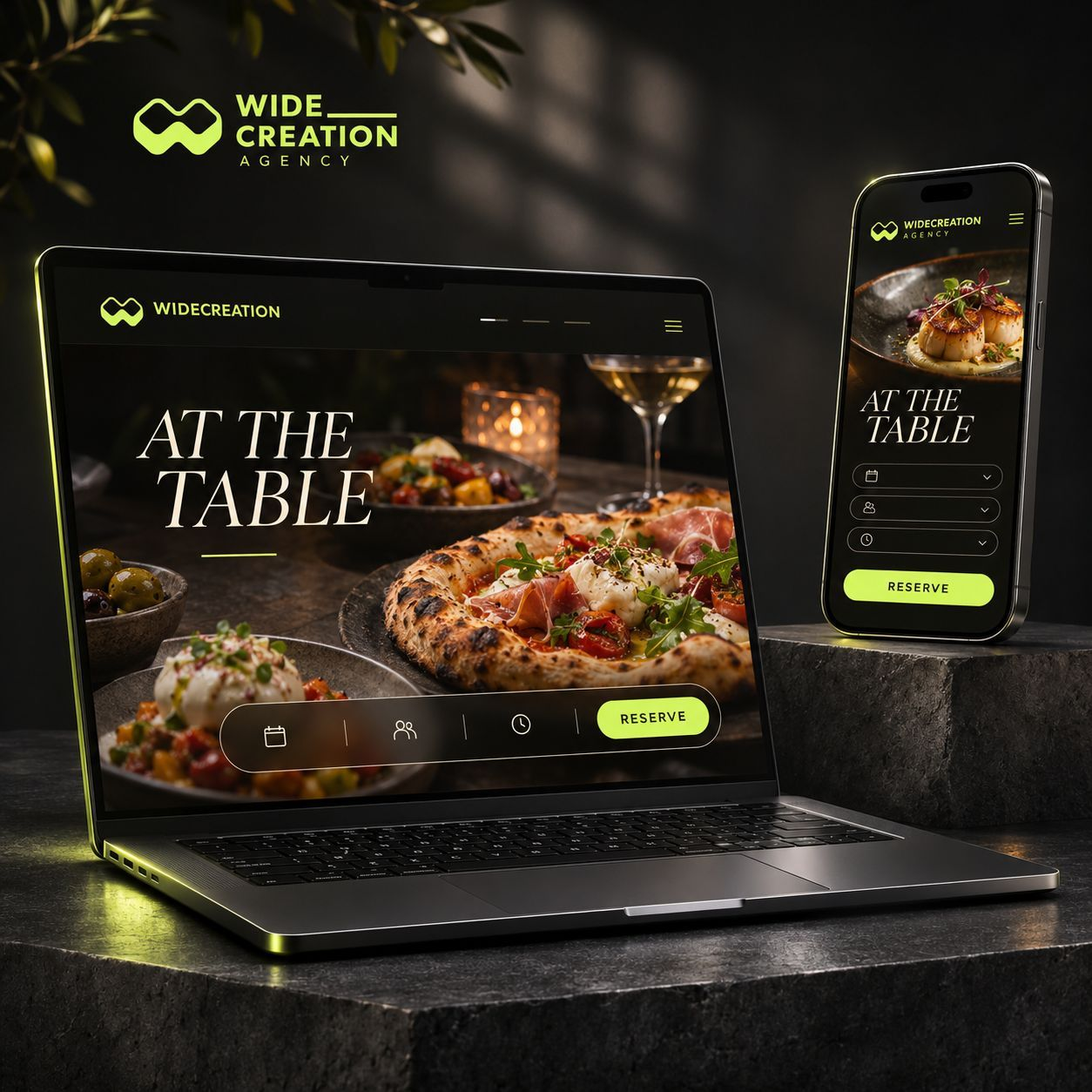
Restaurants · conceptual mockup
Three solutions, from an existing booking engine to a fully bespoke experience.
WEBSITES · RESTAURANTS
EXPLORE / WEBSITES
Explore your website solution
Choose a topic or browse the complete presentation.
WEBSITES · RESTAURANTS
From website visit to booking.
01 / GOAL
The booking journey depends on the venue and the system it already uses.
THE GUEST EXPERIENCE
Choose a date, time and party size. See what is available and follow a clear path to confirmation.
FRONT-OF-HOUSE OPERATIONS
Manage tables, sittings, capacity and exceptions. Availability reflects the rules for each service.
Guests always know whether they have submitted a request or received a confirmed booking.
WEBSITES · RESTAURANTS
Three integration options.
02 / SOLUTIONS
The right option depends on your current system and how much of the booking journey you want to control.
01 ESSENTIAL
Existing engine
Your website presents the venue and directs guests to your current booking system.
Confirmed by your provider
02 INTEGRATED
Branded search
Guests search and select on your site, then complete their booking in the existing engine.
Confirmed by your provider
03 BESPOKE
Your own engine
Guests book on your website, with availability based on your tables and service rules.
Confirmed in the central system
WEBSITES · RESTAURANTS
Essential: connect your booking system.
03 / SOLUTION 01
For restaurants that already use a booking system they want to keep.
01
A website tailored to your brand
Content, photography and menus, plus SEO and clear calls to action.
02
Booking through your provider
The booking button opens the existing engine or widget. It still handles availability and confirmation.
01
Discover
Get to know the venue
02
Choose
Table and time
03
Book
External booking engine
04
Confirm
Booking provider
WEBSITES · RESTAURANTS
Integrated: branded availability search.
04 / SOLUTION 02
Guests start on your website. The final step depends on what your booking provider supports.
ON YOUR RESTAURANT WEBSITE
Guests enter the date, time and party size. Options and availability appear in your brand style.
IN THE BOOKING SYSTEM
Guests complete checkout and receive confirmation via a link, widget or supported integration. The provider may limit how the final step looks.
Before quoting, we check the API, widget, branding, tracking and transfer of the guest’s selection.
WEBSITES · RESTAURANTS
Bespoke: built around your service.
05 / RESTAURANT OPERATIONS
We design the booking engine around your actual capacity and service rules.
01
Configure
Tables, sittings, capacity, zones, opening hours, exceptions and group rules.
02
Book
Date, time, party size and preferences. Request approval or confirm immediately, according to your rules.
03
Manage service
A shared team view for changes, cancellations, the waiting list and guest communication.
04
Take payments
Optional deposits or prepayment, with an agreed cancellation policy and payment provider.
WEBSITES · RESTAURANTS
Guest support before the visit
OPTIONAL / AI ASSISTANT
From a question about a visit to a group enquiry, with a handover to your team.
01
Useful information
Opening times, location, groups and restaurant policies
02
Bookings
Guidance to the existing booking engine
03
Groups
Enquiries for groups and special occasions
04
Your team
Escalation of questions that need a team response
Food information approved by the restaurant. Availability and confirmation require a compatible integration.
WEBSITES · RESTAURANTS
Booking management for your team.
06 / MANAGEMENT DASHBOARD
The dashboard supports daily decisions and clearly separates new requests from confirmed bookings.
BOOKINGS
New, confirmed and cancelled
Dates, guests and notes
History and available actions
AVAILABILITY
Tables, sittings and capacity
Capacity limits and exceptions
Sync and alerts
ANALYTICS
Where requests come from
Conversion at each step
Revenue, where data is available
ILLUSTRATIVE VIEW · FIELDS, PERMISSIONS AND INTEGRATIONS ARE AGREED IN THE PROPOSAL
WEBSITES · RESTAURANTS
07 / DASHBOARD EXAMPLE
Floor plan and booking diary
Illustrative dashboard showing tables, sittings and bookings in one place.
FLOOR PLAN
Floor plan and table status
01
02
03
04
05
06
TABLE 02
19:30 4 guests
DIARY / FRIDAY
Booking diary by sitting
19:00
Table 2
19:30
Table 5
20:00
Group · 8
20:30
BOOKINGS / TODAY
Booking overview
Ana Ribeiro
19:00
Confirmed
Bruno Martins
19:30
New request
Carla Gomes
20:00
Confirmed
Illustrative interface. The final layout and features depend on the agreed scope.
WEBSITES · RESTAURANTS
Bookings confirmed only after acceptance
08 / BOOKING RELIABILITY
Reliability depends on the implementation, the API in use and testing with your team during real service.
01
Live availability
Check availability again just before confirmation.
02
Simultaneous requests
Protection against duplicates and competing bookings.
03
Payments and errors
Payment and booking statuses stay in sync. Errors never trigger a false confirmation.
04
Access and privacy
Team permissions, data retention and consent where applicable.
WEBSITES · RESTAURANTS
JOURNEY / OUTCOMES
From discovery to a visit
Bookings and walk-ins need different journeys and measures.
Book a table
Menu and trust → date and party size → enquiry or confirmed booking.
Visit without booking
Hours, location and menu → call or directions → arrival at the restaurant.
Track outcomes
Enquiries, confirmed bookings, covers and attendance when recorded.
Confirm the visit
Calls and direction requests signal intent. Attendance is confirmed by operations.
WEBSITES · RESTAURANTS
09 / PRICING
Pricing by level of integration.
Scroll the table to see all columns.
SOLUTION | SCOPE | PRICE |
|---|---|---|
ESSENTIAL | Website + link to your existing booking engine | From €300 |
INTEGRATED | Branded presentation and search + integrated booking, checkout and payment through your chosen platform | From €500 |
BESPOKE | Bespoke engine + dashboard for bookings and floor management | From €1,000 |
Third-party subscriptions, domain, maintenance, payment fees and additional integrations are agreed separately.
WEBSITES · RESTAURANTS
We define the journey before building.
PROPOSAL / NEXT STEPS
A useful proposal starts with your current systems and operating rules.
01
Discovery
Goals, desired experience and the booking system currently in use.
02
Technical validation
APIs, provider costs, payments and available data.
03
Scope and price
Design, content, integrations, testing and support in a detailed proposal.
04
Go live
Testing with your team and support during the first bookings.
→
→
→
WEBSITES · RESTAURANTS
10 / PROPOSAL
Information for your proposal
Your answers connect the website to your capacity and the way you run service.
01
Capacity and demand
How many seats, sittings and groups do you serve? Which days and times need support?
02
Current bookings
Which booking tool do you use? How do you handle deposits, no-shows and groups?
03
Goal and measurement
Are you aiming for direct bookings or walk-ins? How will you confirm the results?
04
Team and launch
Who confirms requests and updates information? What are the timing and budget?
WEBSITES · RESTAURANTS
Solutions that complete your project
CONTINUE / SOLUTIONS
Explore the topics that are relevant to your goals.
WEBSITES · RESTAURANTS
More bookings. Service that runs smoothly.
Tell us how you run service. We design the online booking process around your hours, tables and team.
01
CONTEXT
Tables, hours and rules
02
SOLUTION
Bookings and floor management
03
PROPOSAL
Scope and pricing