
Websites
Real estate websites
A real estate website connecting property presentation with enquiries and sales follow-up. The presentation brings together search, property pages, viewing requests and owner information, with content and integrations defined for the project.
Overview and preparation
Who it is for
For real estate businesses organising listings and commercial enquiries.
What you will find in this presentation
- Listings with location, property type and price filters.
- Galleries, features and information or viewing requests.
- Pages for owners, the team, coverage areas and contact details.
Before we begin
- Gather listings, features, images and team information.
- Identify sales systems and who follows up enquiries.
Prices and terms are provided in this presentation and the PDF. The final scope is confirmed in the proposal for each project.
READ ON THE WEBSITE
Presentation content
Choose a section in the contents or keep reading. The PDF remains available as an alternative.
WEBSITES · REAL ESTATE

W E B D E V E L O P M E N T
Real estate website
Property listings, viewing requests and enquiry management in a bespoke website.
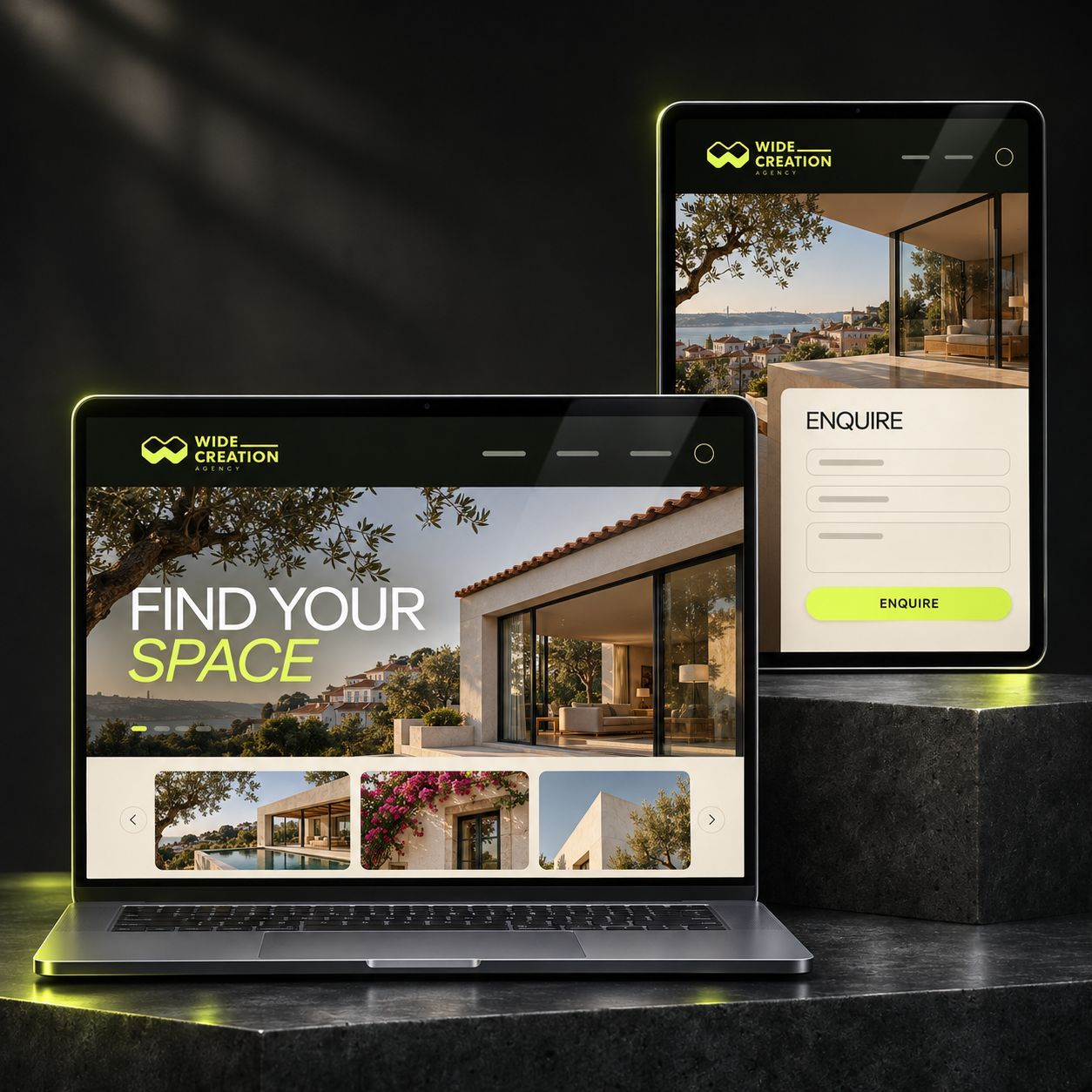
Real estate · conceptual mockup
WEBSITES · REAL ESTATE
EXPLORE / WEBSITES
Explore your website solution
Choose a topic or browse the complete presentation.
WEBSITES · REAL ESTATE
Core pages
WEBSITE STRUCTURE
Visitors can search for properties, request a viewing or ask the agency for a valuation.
Home
Agency introduction, quick search and featured properties.
Buy and rent
Property listings with filters for location, property type and price range.
Property details
Photo gallery, description, features and forms to request information or a viewing.
Sell or let
A page for property owners, with an overview of the service and a valuation request form.
About us
Introduction to the agency, its team and the areas it covers.
Contact
Contact form, telephone, WhatsApp and location.
WEBSITES · REAL ESTATE
Areas, developments and services
OPTIONAL PAGES
These pages can be included at launch to reflect your portfolio and services.
Areas we cover
A dedicated page for each area, with local information and available properties.
Developments
A page for each project, with photos, floor plans, property types and an enquiry form.
Property services
Dedicated pages for services such as valuations, buying support and rental management.
Agents
Individual profiles with contact details and current listings.
Sold and let properties
A selection of completed transactions, with client testimonials where available.
WEBSITES · REAL ESTATE
Property search, investment and careers
OPTIONAL PAGES
Dedicated pages and forms for buyers, investors and prospective team members.
Tailored property search
A form for clients to specify their preferred area, property type, budget and features.
Buying and selling guides
Pages covering the steps, paperwork and frequently asked questions for buyers and sellers.
Property investment
Available investment opportunities and a dedicated enquiry form.
Careers
A page to advertise opportunities and receive applications from property agents.
WEBSITES · REAL ESTATE
News and articles
WEBSITE CONTENT
Publish agency news, local area guides and articles about buying, selling and renting.
Written by WIDECREATION
We agree the topics with you, write the articles and publish them once approved.
Written by your team
Your team supplies the copy and we format and publish it on the website.
Content for launch
We agree how many articles go live at launch and who will write them.
WEBSITES · REAL ESTATE
From a property to a viewing enquiry
JOURNEY / PROPERTIES
A clear listing and an enquiry with context help the sales team.
01
Property
Reference and information
02
Enquiry
Interest and contact details
03
Your team
Assigned owner and next action
A CLEAR JOURNEY
Present
Photographs or visualisations, key features, location and contact.
Gather context
Property of interest, goals, availability and contact details.
Follow up
Enquiry record, assigned sales owner and next CRM action.
Illustrative journey; content and integrations are defined in the proposal.
WEBSITES · REAL ESTATE
Back office with integrated CRM
WEBSITE MANAGEMENT
Your team manages listings and tracks submissions from every website form in one place.
Manage properties
Add and publish properties, edit listings and update prices and availability.
Categorise enquiries
The CRM records each submission by enquiry type, such as viewings, information requests, valuations or tailored searches.
Link enquiries to properties
Enquiries from a listing or with a valid reference are linked to the property. General enquiries remain grouped by type.
Automated email alerts
Choose which forms trigger alerts on new submissions and assign one or more recipient email addresses to each form.
WEBSITES · REAL ESTATE
Property enquiry qualification
OPTIONAL / AI ASSISTANT
From property interest to an enquiry with context for the sales owner.
01
Requirements
Preferred area, property type, purpose and budget
02
Availability
Timeline and preferences for contact or viewings
03
Properties
Guidance to listings with available information
04
Sales team
Enquiry summary delivered to the sales owner
Current listing searches and viewing appointments depend on integration and sales team rules.
WEBSITES · REAL ESTATE
What we define before starting
PROPOSAL / DELIVERY
Investment follows the listings, systems and deliverables.
Scope
Initial listings, pages, languages, content and owners.
Integrations
Listing sources, updates, CRM and permissions.
Delivery
Approved structure, mobile tests, forms and access.
Investment
Development, licences and support itemised in the proposal.
01
Structure and content
Agreed scope and materials
02
Listings and forms
Agreed setup and integrations
03
Testing and access
Validation with your team
DELIVERY / VALIDATION
WEBSITES · REAL ESTATE
Launch scope
PROPOSAL / NEXT STEPS
Your answers help us define the scope, budget and development timeline.
Listings at launch
How many properties should be published at launch? An estimate is enough.
Forms and alerts
Which forms do you need? Which send alerts, and to which email addresses?
Optional pages
Which areas, developments or profiles should be included, and how many?
News and articles
Should this section be included? How many articles, and who will write them?
WEBSITES · REAL ESTATE
NEXT STEPS
Information for your proposal
Your answers define the initial listings, sales journey and launch priorities.
01
Listings and updates
How many listings at launch? Where does the data come from, and who updates prices and availability?
02
Enquiries and response
Which enquiries do you want? Who responds, how quickly, and with which required details?
03
CRM and content
Do you use a CRM or property feeds? Which areas, developments, languages and content do you need?
04
Launch and goals
What are the qualified-enquiry goal, deadline and budget? Who approves the project?
WEBSITES · REAL ESTATE
Solutions that complete your project
CONTINUE / SOLUTIONS
Explore the topics that are relevant to your goals.
Visualisations that support the presentation of spaces.
Properties, your team and the areas you serve.
Visual consistency for your agency and its communication.
Area, property type, interest and contact details for your team.
Services, packages, terms and investment.
WIDECREATION projects and selected work.